Saturday, October 4, 2014

MICROSOFT ANNOUNCES WINDOWS 10

Today Microsoft officially unveiled the latest version of its traditional computer operating system, curiously called Windows 10.

Touted as the company's "most comprehensive platform, ever," Windows 10 stresses a single product family, platform, and store. While the announcement covered quite a bit in terms of enterprise customers, general consumers have some changes to look forward to as well—one of which is an updated and familiar Start Menu.


The new version looks more like the pre-Windows 8 Start Menu, revealing a list of apps, folders, and a search bar, but to the side will be a series of Live Tiles. Essentially, you'll find a Windows 7 Start Menu with a Windows 8 twist. The search function works much like it does when typing from the Windows 8 Modern UI, revealing apps, files, and web results.

Windows 8-style apps can now be windowed within the traditional desktop, adding more flexibility in how you use them—currently, they can only be used at full-screen or within the confines of "snapped" windows. For the newly-designed windowed apps, you will be able to snap them to the edges of the screen like you would from the traditional Windows desktop.

Microsoft has also added a new multi-tasking feature that looks and works similar to what we see on other platforms. When you initiate "Task View" a series of small desktop views will be displayed at the bottom of the screen, with larger previews of the apps being shown off in the middle of the display. You can also quickly select and move around apps from different desktops with a new "Snap Assist" function, which will be nice for the power users out there.


While a Windows 7-style Start Menu is good and all for mouse users, Microsoft will also introduce a different version for those using touchscreen computers. Instead of a small menu consisting of a bunch of text and small Live Tiles, touch users will be greeted with something that more resembles the Windows 8 Modern UI, while still in the traditional desktop. Microsoft is really working to blend its two distinct interfaces into one experience that works for all users.

If you want to get your hands on an early version of Windows 10, Microsoft will be launching its Windows Insider Program tomorrow, offering a preview build for both laptops and desktops. The company plans to discuss more about consumer-facing changes during the first part of 2015.


Windows 10 will be shipping later next year.

What do you think of the changes coming to Windows 10? Let us know in the comments below.


Source : www.ign.com

Hope you like this post of ours, to read more post of similar and many more on blogging, enter your email and subscribe with us to receive updates of this blog via email or subscribe to as a reader.

Sunday, August 3, 2014

Counter Strike 1.6 Servers In Pakistan

Here is a list of Counter-Strike 1.6 Servers in Pakistan.
Most of them are hosted in Pakistan while others are hosted elsewhere on VPS or Dedicated Servers.
If any Pakistani Server is missing in this list or you want your CS 1.6 Server added, please feel free to post your Server’s IP in comments.
  • ZIA NORMAL CS 1.6 SERVER       110.93.216.206:27016
  • !nN0c3nT’x s3rV3r       115.42.65.178:27014
  • CS Pakistan Server       182.180.66.151:27015
  • ZIA INFERNO SERVER       110.93.216.206:27015
  • ZIA GUN GAME SERVER       110.93.216.206:27017
  • OLd SchooL Afk killer       176.57.142.154:27041
  • aD33L’s NormaL ServeR       115.42.65.178:27015
  • DEMOLISHED ERA        5.231.60.6:27015
  • Brothers ||GAMMING|| $erver       182.184.52.240:27015
  • J I N’s Pak Gamerz       87.98.144.171:27076
  • OLd SchooL GunGame       87.98.144.171:27000
  • DMasti.Pk Staff Match Server       103.24.96.100:27015
  • WarZone |Afk_6killer       193.192.58.206:27046
  • -=[PaKLite]ZoMbie SerVeR       207.58.185.104:27015
  • W@R GAM!NG       42.201.187.147:27015
  • XTR3M3 RuL3$       182.188.238.91:27015
  • NewSchool|Clanwar       176.57.188.35:27045
  • NewSchool|Sentry       176.57.188.35:27044
  • NewSchool|public       176.57.188.35:27043
  • .::ExtremE Alfa::.       193.192.58.189:27048
  • [CM]| Public Server       59.103.151.144:27024
  • C$ ROCKING     182.178.36.233:27015
  • C$ Pakistan $erver [!$$G!.G@M!NG]     182.180.90.122:27016
  • [CM] | Afk_6killer     176.57.188.22:27036
  • ipexx grenade match server     180.92.148.101:27015
  • {$H3LL} Public Server     5.231.34.158:27015
  • ShxPear Amx Kill3r Gaming Server     182.180.93.50:27015
  • FeveR Official Public Server     111.92.159.150:27015
  • FoReVeR GAMING SERVER     39.42.212.72:27015
  • Official server by Clan =Dip=     182.181.191.171:27015
  • S.K GaMinG [Normal SerVer]     SerVer Ip : 182.180.93.50:27015
  • -=Young Evils | Public | Server=-     5.231.66.131:27015
  • -=Young Evils | DeathMatch | Server=-     5.231.51.114:27021
  • -=Young Evils | Small Maps | Server=-     5.231.63.115:27019
  • AtankWadi Clanwar     182.184.31.199:27040
  • STR!KER Gaming Server     122.129.73.198:27037
  • PaK <3 Inferno     176.57.188.42:27043
  • fTw|- Zombie Plague[VIP+Bazooka]     39.50.203.167:27032
  • fTw|- Hide ‘N’ SeeK[VIP+FDL]     39.50.203.167:27016
  • fTw|- Public Gaming Server     39.50.203.167:27025
  • fTw|- Death Run[VIP+FPS1000]     39.50.203.167:27017
  • fTw|- Death Match Server     39.50.203.167:27018
  • fTw|- Clan War Server     39.50.203.167:27019
  • Funny Paki ultra server     5.231.64.41:27015
  • Dead Trigger [Pak-Hosted] ©®™     122.129.73.108:27016

P.S: This data is collected by our Auto Server Crawler and from online resources (like GameTracker, Community Forums).
If you find anything inaccurate or outdated, please let us know!

Counter Strike 1.6 Servers In Germany

List of Counter-Strike 1.6 Servers in Germany.
Most of them are hosted in Germany while others are hosted elsewhere on VPS or Dedicated Servers.
If any German Server is missing in this list or you want your CS 1.6 Server added, please feel to post your Server’s IP in comments.
  • Tequila DeathMatch DD2 Only 193.192.58.34:27065
  • Sirmium Arena ® | Assault Maps Only 176.57.142.99:27042
  • Zombie Wars Advance 1.6 83.136.82.14:27016
  • =|FaLCoN|= [14] 83.136.82.14:27015
  • [RoZ].:Rise of ZombieS[1]:. 193.192.59.74:27043
  • CS2.EVILZCS.RO 89.40.233.38:27015
  • Tequila DeathMatch Inferno Only 176.57.142.179:27092
  • BalkaN GaminG DeathMatch 176.57.142.179:27054
  • [ZM] FantasY Zombie 193.192.59.227:27027
  • AlcatraZ ~ [de_dust2] 193.192.58.53:27162
  • Sirmium Arena 176.57.188.25:27015
  • Fatality [COD:MW4] 176.57.142.154:27099
  • 24~Onlypro100!*No4uter! 31.220.26.143:27003
  • Relax DeathMatch 193.192.58.53:27050
  • -=Live For Life=–[De_dust2] Only 193.192.59.162:27069
  • Respawn.Arenacs.Net     188.240.231.245:27015

P.S: This data is collected by our Auto Server Crawler and from online resources (like GameTracker, Community Forums).
If you find anything inaccurate or outdated, please let us know!

Counter Strike 1.6 Servers In India

List of Counter-Strike 1.6 Servers in India.
Most of them are hosted in India while others are hosted elsewhere on VPS or Dedicated Servers.
If any Indian Server is missing in this list or you want your CS 1.6 Server added, please feel to post your Server’s IP in comments.
  • [Elite] KnifeArena     46.99.137.246:27030
  • RkS Public Server     85.25.45.235:27038
  • Facebook Public | Original     176.57.188.31:27055
  • New CS Server     176.57.129.85:27021
  • Facebook Gaming Server #1     85.25.33.10:27015
  • WISH-CS     223.223.144.60:27015
  • CSDM 2.1.2 ] – [ PlaY HarD ]     46.102.116.130:27015
  • RedBack Public Server #1     62.75.216.118:27021
  • [ONE and ONLY] [Soccerjam]     193.192.58.53:27022
  • Jo!ster |A-1.:NO[\/]3RCY CLUB:.PUB#1     5.10.80.163:27019

P.S: This data is collected by our Auto Server Crawler and from online resources (like GameTracker, Community Forums).
If you find anything inaccurate or outdated, please let us know!

Counter Strike 1.6 Servers In Argentina

List of Counter-Strike 1.6 Servers in Argentina.
Most of them are hosted in Argentina while others are hosted elsewhere on VPS or Dedicated Servers.
If any Argentinian Server is missing in this list or you want your CS 1.6 Server added, please feel to post your Server’s IP in comments.
  • [CiMSP.Net] ARG #5 190.210.177.172:30004
  • 01# [ OnlyArg.com ] 200.43.192.176:27016
  • HDS.BG DUST2 79.124.67.5:27018
  • -ARGENTINA CS-#5 200.43.192.156:27019
  • Skaviados by Localstrike 200.43.192.107:27015
  • [CiMSP.Net] ARG #3 190.210.177.172:30002
  • -ARGENTINA CS-#4 200.43.192.185:27025
  • LOSRAMONESCS 32 PUB 200.43.192.151:27015
  • #6 JAILBREAK con lo pibito 200.43.192.152:27016
  • Comunidad FX Games 200.43.192.110:27015
  • [CiMSP.Net] ARG #2 [Only de_Dust2] 190.210.177.172:30001
  • #01 – High Voltage Games 200.43.192.111:27015
  • [LocalStrike] Clan Busters [Pub] 200.43.192.183:27017
  • [LocalStrike] Clan Virus [PUBLICO] 200.43.192.111:27021
  • [LocalStrike] Clan Busters 181.177.204.129:27015

P.S: This data is collected by our Auto Server Crawler and from online resources (like GameTracker, Community Forums).
If you find anything inaccurate or outdated, please let us know!

Counter Strike 1.6 Servers In Romania

List of Counter-Strike 1.6 Servers in Romania.
Most of them are hosted in Romania while others are hosted elsewhere on VPS or Dedicated Servers.
If any Romanian Server is missing in this list or you want your CS 1.6 Server added, please feel to post your Server’s IP in comments.
  • ZmOldSchool.CsBlackDevil.Com [Zombie Plague] 89.44.246.19:27015
  • ThunderZM.CsBlackDevil.Com 89.40.233.100:27015
  • GOLD.INDUNGI.RO 89.44.246.174:27015
  • Cs.Gajik.Net 193.84.64.118:27015
  • PUB.CSTRIKEARENA.COM 89.44.246.176:27015
  • CS.INDUNGI.RO # OFFICIAL INDUNGI SERVER 93.119.24.206:27015
  • Romania.CS16.ro [CSDM 2.1.3c] 89.44.246.58:27015
  • PUB.GAJIK.NET 193.84.64.84:27015
  • RELAX.INDUNGI.RO # OFFICIAL SERVER 93.119.24.66:27015
  • KILL.LALEAGANE.RO 93.119.24.46:27015
  • ..:: Zombie.IlegalZone.Com ::.. 93.119.24.134:27015
  • CS.LALEAGANE.RO +18 [www.laleagane.ro] 93.119.24.200:27015
  • ~ ESPORTS.CS1.RO || WWW.CS1.RO ~ 93.119.24.125:27015
  • RESPAWN.LALEAGANE.RO 89.44.246.34:27015
  • ZoMbIe.CsDeViLs.Com KING OF csdevils 89.44.246.220:27015
  • war4.Freakz.ro | Classic     89.44.246.193:27015
  • FURIEN.BESTIA.RO | Furien     93.119.26.193:27015
  • ZoMbIe.DeViLZ.Ro KiNg OF ZoMbIe LaNd Go     93.188.160.72:27015

P.S: This data is collected by our Auto Server Crawler and from online resources (like GameTracker, Community Forums).
If you find anything inaccurate or outdated, please let us know!

Counter Strike 1.6 Servers In Russia

List of Counter-Strike 1.6 Servers in Russia.
Most of them are hosted in Russia while others are hosted elsewhere on VPS or Dedicated Servers.
If any Russian Server is missing in this list or you want your CS 1.6 Server added, please feel to post your Server’s IP in comments.
  • [Санкт-Петербургский] Public [Dust2] 91.210.107.27:27015
  • [P1zzaServ] [Public] #1 77.220.180.177:27015
  • .::specially for you::.[Public] #1 77.220.182.222:27015
  • Патриоты СССР 77.220.180.75:27015
  • © ORIGINAL GUNGAME 91.218.228.99:27015
  • Первый Игровой Сервер 77.220.180.80:27015
  • [CS]Kamensk66rus 109.202.33.58:27015
  • *JXP*ПЛАНОКУРЫ_ТУТ+18+есть-4ё 83.222.109.28:27038
  • Армия 16+ 83.222.115.242:27055
  • NewWorldZM.CsBlackDevil.Com 89.40.233.201:27015
  • Fatality | Victory 193.192.58.216:27029
  • ДОПИНГ СЕРВЕР 77.220.182.6:27015
  • Легенда сервер 77.220.180.169:27015
  • Околосервера 77.220.180.82:27015
  • CS 1.6 SERVERS #1 IN TATARSTAN 77.220.182.180:27015

P.S: This data is collected by our Auto Server Crawler and from online resources (like GameTracker, Community Forums).
If you find anything inaccurate or outdated, please let us know!

How to install Counter-Strike 1.6


counter strike 1.6 servers download, counter strike 1.6 server hosting, counter strike 1.6 deathmatch server, counter strike 1.6 game servers, server counter strike 1.6, counter strike servers, counter strike 1.6 servers india, counter strike source servers, dedicated server counter strike 1.6, counter strike 1.6 servers free download


Many friends ask me “How to install Counter-Strike?” and “What are system requirements for installing Counter-Strike?
So, I am writing a step by step tutorial on installing Counter-Strike 1.6 on a Windows based computer.

System Requirements:
The minimum requirements for running Counter-Strike 1.6 are a 500Mhz Processor, 96MB RAM, 16MB video card and around 512MB of free disk space.
However, the specifications for a smooth gameplay would be an Intel Core i3 Processor, 2GB RAM, 1GB video card and around 2GB of free disk space.
For superb results, I recommend the following system specifications:
Processor: Intel Core i7
RAM: at least 4GB
Video Card: at least 2GB *
Hard Disk: at least 4GB free space **
* NVIDIA GeForce GTX 560 would be great
** Enough for lots of maps and cached files

Installation:
These installation steps are tested on Windows XP/2003/7/8

Download cs16v7_cspak.zip
Extract all files from zip file in any folder.
Run cs16full_v7.exe.
Run cs16patch_full_V21.exe .
In case you get file missing errors during the setup, just ignore them!
Press next on each step until the setup is completed.

A shortcut named “Counter-Strike 1.6” would be created on your desktop once the game is successfully installed.

Enjoy playing Counter-Strike 1.6 :)

PS: If you get any errors following the above steps, please comment below and I will try to find a solution!
Regards,
TZ

Port Forwarding on DSL Modem / Router

These steps are for FiberHome AN1020-25 ADSL Wireless Modem provided by PTCL Broadband.
Open http://192.168.1.1/ in your Web Browser.
A dialog will appear asking for Username and Password.
Enter admin in both Username and Password.
If the Username and Password are correct, you will see a page like below:
home


Now, click on “Advanced Setup” and then click on “NAT“:
nat

Click on “Add” and enter the Local IP and Port you want to forward.
Here I am forwarding Port Number 27015 of UDP which is default port for Counter-Strike 1.6 Server.
This port is being forwarded to my computer’s IP which is 192.168.1.2
virtual
In case you are setting up a Web Server like WAMP/XAMPP, the default HTTP Port Number is 80 of TCP
Click “Save/Apply”.
Your port should be forwarded successfully now!

How To Setup Counter Strike 1.6 Servers

Requirements
  1. Computer
    You can setup Counter-Strike 1.6 Server on any computer.
    This tutorial is for computers running Windows Operating System (Windows XP / Windows Server 2003 / Windows 7)

  2. Internet Connection
    For Online Server, an Internet Connection is required.
    This tutorial is for home computers running on DSL Connection or WiMAX connection.
    For 16 slots server, a 1Mb internet connection is sufficient.
    For best performance, a 4Mb internet connection is preferred which can support upto 32 players.

  3. Static IP
    The Public IP address of dsl connections is Dynamic.
    Which means on every restart of router the Public IP is changed.
    To make the IP static you have to request your DSL provider to provide you a Static IP address.
    PTCL users can get Static IP easily for a monthly charge of 200 rupees.
    Call 1218 from your ptcl number to get a Static IP on your dsl connection.

  4. UPS
    To make your server 24/7 your computer must stay on all the times.
    For that you will need a UPS that will provide backup in case of power outages.


Installation Steps
  1. Download Server
    Download Dedicated Server Setup from here hlds_cspak.zip
    Extract the zip file to any folder.

  2. Server Configuration
    Open server.cfg file in cstrike folder and change “CS 1.6 Server by CounterStrike.Com.Pk” to server name of your choice.
    Right-Click on START_SERVER.bat file and click Edit.
    Make any required changes and save the files by pressing Ctrl + s
    Now Double-Click on START_SERVER.bat
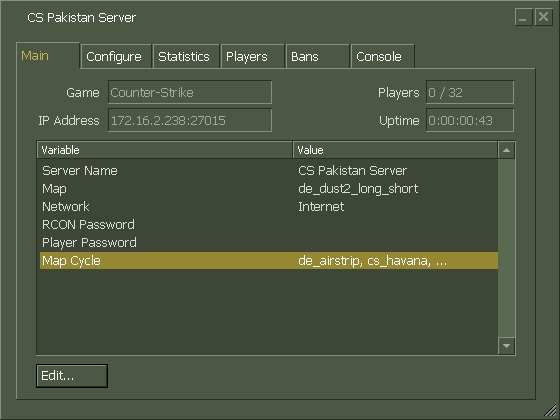
    If everything goes fine, the server console will be started like below.
  3. counter strike 1.6 servers download, counter strike 1.6 server hosting, counter strike 1.6 deathmatch server, counter strike 1.6 game servers, server counter strike 1.6, counter strike servers, counter strike 1.6 servers india, counter strike source servers, dedicated server counter strike 1.6, counter strike 1.6 servers free download

  4. Testing
    This step is just to make sure that you have properly configured the server.
    Open your game and click on Add Server.
    Enter your Private IP with Port and click Add.
    If you can see your server running, you can proceed to the next step.

  5. Open Firewall
    Now you have to open your Windows Firewall so that other people can connect to your server.
    You need to open UDP port 27015 on your windows firewall.
    Follow steps on this link to open Windows Firewall ports:
    http://windows.microsoft.com/en-us/windows/open-port-windows-firewall
    At this stage, you have created a LAN server which means people connected to your Router can now join your server.

  6. Port Forwarding
    Now you have to “Forward the ports from your Router to your Computer” so that Online Players can connect to your server.
    In simple words, all the people connecting to your Router on port 27015 will be forwarded to the port 27015 of your Computer.
    There are hundreds of thousands of router models with different port forwading methods each.
    Here are steps for some routers:
    http://www.counterstrike.com.pk/2014/03/port-forwarding-on-dsl-modem-router/
    For other routers, just google about it and you will find the steps.

  7. Testing
    This step is to make sure the firewall and ports are properly opened.
    Send your Public IP to your frind and ask him to join your server (182.180.66.151:27015)
    To find your Public IP, visit this link : http://www.whatismyip.com/
    whatismyip
    Now you have created an Online Server which means people from all around the world can join your server.


Thanks to Muhammad Ather, Saud Irfan for their help and Shoaib for the latest HLDS setup!

Having problems? Just comment below and we will find you a solution!

Friday, July 11, 2014

Counter Strike 1.6 Game Cheats


Counter Strike PC Game Cheat : Arctic sniper rifle
Counter Strike PC Game Cheat Code : givespaceweapon_awp

Counter Strike PC Game Cheat : Auto-aim with sniper rifle
Counter Strike PC Game Cheat Code : sv_aim

Counter Strike PC Game Cheat : Adjust gravity
Counter Strike PC Game Cheat Code : sv_gravity (-999 - 999999)

Counter Strike PC Game Cheat : See and fire through walls and objects
Counter Strike PC Game Cheat Code : gl_zmax (0-9999)

Counter Strike PC Game Cheat : View other players' frags
Counter Strike PC Game Cheat Code : cl_hidefrags 0

Counter Strike PC Game Cheat : Faster forward motion
Counter Strike PC Game Cheat Code : cl_forwardspeed 999

Counter Strike PC Game Cheat : Faster backwards motion
Counter Strike PC Game Cheat Code : cl_backspeed 999

Counter Strike PC Game Cheat : Faster side motion
Counter Strike PC Game Cheat Code : cl_sidespeed 999

Counter Strike Cheat : Level select
Counter Strike Cheat Code : changelevel 
Counter Strike Cheat : Weapon selectCounter Strike Cheat Code : give

Use one of the following entries with the 'give' code to get the corresponding weapon.
AK-47
weapon_ak47

Benneli xm1014
weapon_xm1014

C4
weapon_c4

Colt M4a1 carbine
weapon_m4a1

Commando
weapon_sg552

Fn P90
weapon_p90

Glock 18 pistol
weapon_glock18

HE grenade
weapon_hegrenade

M3 super shotgun
weapon_m3

MAC-10
weapon_mac 10

MP5
weapon_mp5navy

Para
weapon_m249

Scout
weapon_scout

SIG p228
weapon_p228

Steyr Aug
weapon_aug

Desert eagle
weapon_deagle

Usp.45 pistol
weapon_usp


Other Counter Strike 1.6 Cheat Codes

Auto-reload enabled
Counter Strike Cheat Code : +reload

Auto-reload disabled
Counter Strike Cheat Code : -reload

Change skins
Counter Strike Cheat Code : skin

Use the following skin names with 'skin' code:
Arab - arab
Arctic - arctic
GSG9 - gsg9
Guerrilla - guerrilla
Hostage - hostage
SAS - sas
SEAL - seal
Terrorist - terror
VIP - vip

See things brightly without flashlight
Counter Strike Cheat Code : lambert -1.0001

SetC4 timer
Counter Strike Cheat Code : mp_c4timer (-1000-1000)

Hyper auto-aim enabled
Counter Strike Cheat Code : sv_clienttrace 999999999

Hyper auto-aim disabled
Counter Strike Cheat Code : sv_clienttrace 1

Get $16,000
Counter Strike Cheat Code : impulse101

Splatter bones and body tissue
Counter Strike Cheat Code : impulse102 (or impulse202)

Set freeze period at the start of rounds. Set to 0 to disable (default is 6)
Counter Strike Cheat Code : mp_freezetime (#)

Set maximum length in minutes a round can last (default is 5)
Counter Strike Cheat Code : mp_roundtime (3-15)

Toggle auto-help hint messages (default is 1)
Counter Strike Cheat Code : ah (0)

Toggle crosshairs in observer mode (default is 1)
Counter Strike Cheat Code : cl_observercrosshair (0)

Toggle flashlight use (default is 1)
Counter Strike Cheat Code : mp_flashlight (0)

Toggle footsteps (default is 1)
Counter Strike Cheat Code : mp_footsteps (0)

Whiten all surroundings at 800x600 resolution
Counter Strike Cheat Code : r_lightmap 1

Turn off textures
Counter Strike Cheat Code : gl_picmic 3


Other Cheats and Tricks for Counter Strike

NOTE: These cheats work ONLY if they are enabled on the server machine which is very rarely the case! Also, most of the hints don't work with never version of Counter-Strike

Hints
NOTE: As their name suggests hints are not exactly Half-Life: Counter-Strike cheats, and are usually just simple (but very useful) tips on how you can unlock secret level, features, find hidden areas and such. Hopefully these will make playing Half-Life: Counter-Strike even more entertaining.

Bind Keys
To activate codes easier, bind them to keys. For example, type: bind v "impulse 101" at the console window to bind the "$16,000" code to the "V" key.

59 bullets for Usp.45 Pistol
Buy a Usp pistol, shoot one bullet and reload. Buy the bullets again.

90 bullets for Usp.45 Pistol
Buy a MAC-10 and all its bullets, then buy a Usp.45 Pistol.

120 bullets for Glock pistol
Buy a MP5 and all its bullets, then buy a Glock Pistol. Note: If you already have it, you do not have to buy another one.

98 bullets for Scout
Buy a Scout, shoot one bullet and reload. Then, buy the bullets again.

120 bullets for Steyer TMP
Buy a MP5 and all its bullets, then buy a TMP.

89 bullets for H&K Sniper Rifle
Buy a scout and all the bullets. Shoot once, reload, and buy the bullets again. Then, buy a H&K sniper rifle.

Sniping Ak47
Aim the crosshair in the middle of the enemy and shoot the bullets two by two. When the crosshair becomes large, run and reload. The target should be dead after you shoot the first two bullets.

Silent AWP shots
in the console, type 'bind mouse1 "+attack; impulse 100" ' then press enter. Voila, now when you shoot your AWP or any sniper rifle, your shots will be silent. Be warned, if you try this with a full-auto weapon, chances are you will be killed as the weapon might jam and stop shooting.

Temporary invincibility
Type bind "setinfo model ../oranget" during game play. Keep pressing the key that was bound to that command to become invincible.

Temporary SAS appearance as terrorist
Type bind "setinfo model sas" (for terrorist only). Your whole body will change into UK SAS suit. Keep pressing the key that was bound to that command.

Client Cheats Counter Strike 1.3

Anyone can use these to alter their personal settings.

cl_observercrosshair (default 1) - Set to 1 to enable crosshairs in Observer mode, 0 to disable.
cl_hidefrags (default 1)         - Set to 1 to hide all frag/death counts on the Scoreboard but
                                   your own, 0 to show.
hud_centerid (default 0)         - Set to 1 to center auto-ID text on screen, 0 to have auto-ID
                                   text in the bottom left corner.
lefthand (default 1)             - Set to 1 to use left hand, 0 to use right.
max_shells X                     - X = maximum number of shells at one time
max_smokepuffs X                 - X = max. number of smoke puffs at one time
fastsprites X                    - x = 0 : regular transparent smoke grenade sprites
                                   x = 1 : simple transparent smoke grenade sprites (default)
                                   x = 2 : VERY simple transparent smoke grenade sprites.
adjust_crosshair                 - Each time you type this into the console your crosshair changes
                                   colour. There are 5 colours to choose from.
con_color                        - Change the colour of your HUD. Like con_color "256 256 256"
                                   numeric values can be found by looking in most paint packages.
timeleft                         - Tells you how much time is left on the map
setinfo vgui_menus X             - {X = 0 or 1, 0 disables VGUI menus, 1 enables VGUI menus}
                                   (also available through the "Play CS" ] "Customize" menu)
ah (default 1)                   - Set to 1 to enable auto-help, 0 to disable. Auto-help gives
                                   the player hint messages throughout the game.

Note:
If the buy weapon system malfunctions, disable the vgui through the "Play CS" ]
"Customize" menu.

Infokey settings. Type "setinfo" to check the status of all infokey settings. To change
one, type "setinfo [keyname] [value]". InfoKey Keynames dm (default 1) Set to 1 to display
map briefings after loading new levels, 0 to disable.


Cheat:
------

type in console : LISTPLAYERS
you will see players numbers then type: KICK #[number of a player you want to kick]
anti-kicking cheat is impossible

POD BOT CHEATS:

minbotskill/maxbotskill skill - The skill level will be within this range if you add a bot
                                without specifying the skill level.
addbot [skill] [team] [name]  - Add a bot with these attributes. Teams: 1 = T, 2 = CT
botchat on|off                - Turn on or off bot chatting
botsvotemap mapnumber         - Orders all dead Bots to vote for Map mapnumber, where mapnumber
                                is a valid number of a map in your mapcycle.
jasonmode on|off              - Controls bot knife-only mode.
botsfollowuser bots           - Sets the maximum number of bots in the team can follow the same
                                user (when radio command "Follow Me" is used).
                                The default is 3.
detailnames on|off            - Turn this on to display the skill number behind names and the
                                [POD] before the name.
collectexperience on|off      - Turn this on to let the bots collect experience from the map
                                they're playing.
shootthruwalls on|off         - This variable specifies if bots are allowed to shoot through
                                walls if they saw an enemy or if they heard someone on the other
                                side of a wall or door.
killbots                      - Kills all bots in the map.
newmap mapname                - Substitution for the "map" command you're used to. Loads a new map.
                                This will work 100% with Bots and no client should get disconnected.
podbotmenu                    - Displays the User-Menu by default bound to the "=" key.
removebots                    - Kicks all bots off of the server. Note that this also changes the
                                min_bots and max_bots variables to 0.

Hint:
-----

Chick :
Type cheat:
bind "/" "setinfo model ../chick"
After you press "/" and continue press, other player saw you "is a chick".
You can type list cheat:
bind / "setinfo model ../orange"
bind / "setinfo model ../feather"
bind / "setinfo model ../oranget"
bind / "setinfo model ../head"
bind / "setinfo model ../hostage"
or you type "mcache", List word that you can cheat,too.

Server Cheats Counter Strike 1.3

mp_startmoney (default 800)   - Sets the amount of money players start with.
mp_logdetail (default 0)      - Bitwise cvar to set the level of detail for
                                logging attacks (bit 0: log enemy.
                                attacks, bit 1: log teammate attacks).
mp_fadetoblack (default 0)    - When set to 1, player's screen fades to black for
                                the remainder of the round when he dies (hud still works
                                normally so player can chat and see the scores, etc.)
                                Overrides mp_forcechasecam.
mp_buytime (default 1.5)      - Designate the desired amount of buy time for each round.
                                Min buy time is .5 minutes. No max buy time.
mp_winlimit (default 0)       - Will cycle the map after one team reaches this many wins.
mp_limitteams (default 2)     - Maximum number of players that one team can have over the
                                other. To entirely disable team limiting, set to 0.
sv_restartround (def. 0 sec)  - Time until the game restarts fresh, or 0 to not restart.
                                This will reset all frags, scores, weapons and money to default.
                                Use this to coordinate clan matches.
mp_autokick (default 1)       - Enable automatic team-killer banning and idle client kicking.
mp_autoteambalance (def.1)    - Toggles auto balancing of teams.
mp_chasecam (default 0)       - Limit observers to chase modes.
mp_c4timer (default 45 sec)   - C4 timer duration. Minimum of 15, maximum of 90.
mp_freezetime (default 6 sec) - The length in seconds of the Freeze period at the beginning
                                of rounds. Set to 0 to disable.
mp_roundtime (default 5 min)  - Min round time is 1 min. Max round time is 9 min. Supports
                                partial minutes (1.5 is 90 seconds).
mp_friendlyfire (default 0)   - Set to 1 to enable friendly fire, 0 to disable.
mp_timelimit (default 0 min)  - Period between map rotations.
mp_maxrounds (default 0)      - Maximum number of rounds to be played on a map, leave at 0
                                to obey mp_timelimit.
mp_footsteps (default 1)      - Set to 1 to enable footsteps, 0 to disable.
mp_flashlight (default 1)     - Set to 1 to enable the use of flashlights, 0 to disable.
mp_tkpunish 0/1               - if set to 1, TK'ers will sit out next round
mp_hostagepenalty X           - X = max. number of hostages you can kill before the server
                                boots you out. setting this to 0 will shut off this command
mp_logmessages 0/1            - used for server admins to spit out chat messages in their
                                log files.
mp_forcechasecam 0/1/2        - When set to 2, not allowed to spectate anyone...player's view
                                stays where the player dies. When set to 1 only allowed to
                                spectate player's own team when player dies. Default 0.

COUNTER STRIKE 1.6 GAME CHEATS

Result                                   Code
---------------------------------------------
$16,000                                - impulse101
Arctic sniper rifle                    - give spaceweapon_awp
Auto-aim with sniper rifle             - sv_aim
Adjust gravity                         - sv_gravity [-999 - 999999]
See and fire through walls and objects,
default is 3600                        - gl_zmax[0-9999]
See things brightly without flashlight - lambert -1.0001
View other players' frags              - cl_hidefrags 0
Faster forward motion                  - cl_forwardspeed 999
Faster backwards motion                - cl_backspeed 999
Faster side motion                     - cl_sidespeed 999
Auto-reload enabled                    - +reload
Auto-reload disabled                   - -reload
SetC4 timer                            - mp_c4timer [1-100]
Hyper auto-aim enabled                 - sv_clienttrace 9999
Hyper auto-aim disabled                - sv_clienttrace 0000
Change crosshair color                 - adjust crosshair
Reveal how much time left on the map   - timeleft
Disable the crosshair to enlarge when
shooting                                - crosshair [1-5]
Set freeze period at the start of
rounds. Set to 0 to disable, default
is 6 [Note]                             - mp_freezetime [seconds]
Set maximum length in minutes a round
aan last, default is 5 [Note]           - mp_roundtime [3-15]
Set minutes between map rotations,
default is 0 [Note]                     - mp_timelimit
Toggle friendly fire [Note]             - mp_friendlyfire [0 or 1]
Toggle footsteps, default is 1 [Note]   - mp_footsteps [0 or 1]
Level select                            - changelevel [map name]
Weapon select                           - give [weapon name]
Skin select                             - skin [skin name]
Restart round                           - sv_roundrestart 5
Set freeze time 0                       - mp_freezetime 0

Atention! For use on server machine only.

Counter Strike 1.6 Weapons Cheat Codes

Weapons

In order to get a certain weapon listed below without buying them, press the ~ key and type in ''sv_cheats 1'', then use one of the following codes with ''give (weapon code)'' for example ''give spaceweapon_awp'' to get an arctic sniper rifle. Note that some of the codes may not work in the other game versions.
EffectCode
gives AK-47weapon_ak47
gives Arcticweapon_awp
gives Arctic Sniper Riflespaceweapon_awp
gives Benelli xm1014weapon_xm1014
gives Bomb Defuserweapon_defuser
gives Colt M4a1 Carbineweapon_m4a1
gives Commandoweapon_sg552
gives Desert Eagleweapon_deagle
gives Dual Berretasweapon_elite
gives Flashbangweapon_flashbang
gives Fn P90weapon_p90
gives Glock 18 pistolweapon_glock18
gives H&K Sniper Rifleweapon_g3sg1
gives HE Grenadeweapon_hegrenade
gives Kevlar Vestweapon_kevlar
gives M3 Super Shotgunweapon_m3
gives MAC-10weapon_mac 10
gives MP5weapon_mp5navy
gives Nightvision gogglesweapon_nightvision
gives Paraweapon_m249
gives Scoutweapon_scout
gives SIG 550weapon_sig550
gives SIG p288weapon_p288
gives Smoke grenadeweapon_smokegrenade
gives Steyr Augweapon_aug
gives Ump.45weapon_ump45
gives Usp.45weapon_usp

Counter Strike 1.6 Get Free Cheat Codes

Press ~ to enter the console on the server machine and type sv_cheats 1 or sv_ 1. Then, change maps by typing changelevel dust (or any other map). Finally, enter one of the following codes at the console to activate the corresponding cheat function. Note: Some codes have been changed or removed with various patch updates for the game.
EffectCode
$16,000impulse101
1= enables pausing(not reccomended)pausable
1= single player enemies visiblemp_allowmonsters
1=cheats onsv_cheats
1=flashlight onmp_flashlight
1=no clippingsv_clipmode
1=turn on auto kick in gamemp_autokick
???unknownsv_bounce
Adjust gravitysv_gravity <-999 - 999999>
Adjust wall and object density; default is 3600gl_zmax <0-9999>
All shots will hit, default is 1sv_clienttrace 999999999
Allows to walk faster in watersv_wateraccelerate 999
Allows you to toggle switching weapons fasterhud_fastswitch (0 or 1)
Arctic sniper riflegive spaceweapon_awp
Auto-aim with sniper riflesv_aim
Auto-reload disabled-reload
Auto-reload enabled+reload
Change crosshair coloradjust crosshair
Change skinsskin
change your starting money in-game!mp_startmoney
Disable the crosshair to enlarge when shootingcrosshair <1-5>
Disables the litte information on the bottom right corner when you have +graph on.-graph
Enables blood thickeninggl_spriteblend <0-1>
Enables unlimited sprayingdecalfrequency 0
Fast Jumpingsv_airaccelerate -9999
Faster backwards motioncl_backspeed 999
Faster forward motioncl_forwardspeed 999
Faster side motioncl_sidespeed 999
Get indicated itemgive
Hyper auto-aim disabledsv_clienttrace 0000
Hyper auto-aim enabledsv_clienttrace 9999
Level selectchangelevel
List cheat commands, press [Page Up] or [Page Down] to scrollcvarlist or cmdlist
Makes you invincibleGod
Refreshes time on the console.timerefresh
Reveal how much time is left on the maptimeleft
See and fire through walls and objectsgl_zmax 0
See things brightly without flashlightlambert
Set freeze period at the start of rounds. Set to 0 to disable, default is 6/1mp_freezetime
set max running speedsv_maxspeed
Set maximum length in minutes a round can last, default is 51mp_roundtime <3-15>
Set minutes between map rotations, default is 01mp_timelimit
SetC4 timermp_c4timer <1-100>
sets accelerationsv_accelerate
sets how fast you accelerate in airsv_airaccelerate
sets how fast you accelerate in watersv_wateraccelerate
sets how fast you stop runningsv_stopspeed
sets round timemp_roundtime
sets the friction in watersv_waterfriction
sets the friction of the gamesv_friction
sets the mode to co-opcoop
sets the mode to deathmatchdeathmatch
sets time on C4 chargemp_c4timer
sets time to buy itemsmp_buytime
Show ping as numbers-numericping
Shows a little information on the very bottom right of your screen+graph
Shows server IP and portnet_address
Shows the last 4 kills of either teamhud_deathnoticetime 9999
Start with 16000mp_startmoney 16000
Suicidekill
The game restarts after 1 secondsv_restartround 1
Toggle auto-help hint messages, default is 1ah <0 or 1>
Toggle crosshairs in observer mode, default is 1cl_observercrosshair <0 or 1>
Toggle flashlight use, default is 1/1mp_flashlight <0 or 1>
Toggle footsteps, default is 1/1mp_footsteps <0 or 1>
Toggle friendly firemp_friendlyfire <0 or 1>
Toggle graphnet_graph <0 or 1>
Toggle map briefings after new levels load, default is 1dm <0 or 1>
Toggle to see ghosts in observer mode, default is 0ghosts <0 or 1>
Unbind key commandunbind
View other players' fragscl_hidefrags 0
Whiten all surroundings at 800x600 resolutionr_lightmap 1

Monday, July 7, 2014

[Tutorial Linux for Create CS Server] Also can be used for "HLDS1 and Orangebox"

[Tutorial UNIX for produce metal Server] can also be used for "HLDS1 and Orangebox"
Hello, during this thread i'll show you ways to form a server metal one.6 with none panel (If u need a panel, i'll guide you in alternative thread) to your server.

First, we have a tendency to should say that UNIX, is that the most suitable choice to "host" an avid server of metal one.6. Why? merely and simple, its checked that UNIX its the most effective choice by their engine and their quick things than Windows (With UNIX all servers of lots of games will get a HIGH and stables Federal Protective Service than WIndows for being a un-stable S.O)

1º- What we have a tendency to need?
- an avid server ( VPS / Dedicated Server ) indifferent.
- Minimum of 256mb ram (If u need a thirty two slot server i'll recomend u min 1gb RAM DDR3)
- Bandwith (Your server have to be compelled to keep connected to 100mbps port and with 100mbps bandwith guaranteed), this can be for not increase the ping of your users.

2º- after we have that we will select UNIX S.O (I like use CentOS half-dozen however u will use , Debian 6, etc etc.)

2.1 - go online your SSH Terminal.

When you area unit connected in your SSH terminal, verify that you simply area unit ussing root account, (Some users like not mount metal Servers with root account, thus if u need, you'll be able to produce a user with root privileges, how?

For CentOS

1-useradd newuser ( useradd fizx , example)
2-password newuser ( word fizx , example)

For debian:
Use same comands and with "sudo useradd"

Before that, kind visudo or /etc/sudoers to feature the account we've recently created few seconds past with root privileges.

You will see this:
· root ALL=(ALL) ALL
Add below it:
· fizx(or the name u used) ALL=(ALL) ALL

Then, u have to be compelled to log with city new account (Centos will not need the comand sudo, however debian yes)

NOW

STEP INSTALLATION #1

First, you've got to transfer the HLDSupdatetool.bin. you'll be able to have a go at it doing:

· wget http://storefront.steampowered.com/downl...tetool.bin
· chmod +x hldsupdatetool.bin
· ./hldsupdatetool.bin

Sometimes you'll be able to get this error:
· uncompress: command not found
-How to fix?
With root account, or account with root privileges, use:
· ln -s /bin/gunzip /bin/uncompress
Then the error are mounted.

./hldsupdatetool.bin: No such file or directory
If your server its sixty four bits, you've got to put in 32-libs version, How?

-&gt; Using: (This comands rely of S.O, thus u will google it and realize easy)
· apt-get install lib32gcc1 OR
· yum install ia32-libs

Before that, u have the ./hldsupdatetool.bin downloaded, you've got to begin.
[b]First do chmod +x ./hldsupdatetoo.bin
and then, use: ./steam

Wait to induce a verify and acquire latest version.
When you get, Checkbooststrapper fifty etc etc click affirmative to agree "ToS of Steam and bla bla bla"

NOW, we are going to place the last command we've to try and do to put in our server, that is:

./steam -command update -game "cstrike" -dir metal -verify_all

Always, to put in a metal server, you need to use that command.
IF you would like to alter the localization of the install server, you'll be able to have a go at it putting:

./steam -command update -game "cstrike" -dir /home/blaba -verify_all (for example)

Then, u have to be compelled to wait to induce verify all files, then city server can begin downloading files.

Then, final thing you've got to try and do its move to the LOC wherever you've got put in the metal server to run it.
./hlds_run -game cstrike (Check if there area unit any error, if any error its showed, perhaps you've got missing libraries, or the sport wasnt put in properly, re-check tutorial again)
Its all its right, and you would like to log-out of SSH (But if u log-out the server is closed automatic), you've got to place the method into a screen mode to stay saving.

How?
Easy, use this comand:

·screen -mdLS cstrike ./hlds_run -game cstrike

Type" screen -r "to resume the screen.
Once resumed press the subsequent keys on your keyboard to detach from it again:

·CTRL+A+D

And that's all. If you've got issues, perhaps post your downside here, and perhaps i will assist you :)

Tutorial simple 100 percent and created by my expertise. within the next days, i'll place a simple config ( to put in AMXMODX remote to your server, and transfer one in every of my server's cfg, which will bring you one thousand Federal Protective Service stables and sensible configs for your server )

Happy Christmas for all and luxuriate in the tutorial
PD: The higher than command to put in server metal one.6 is used for alternative games of VALVE HLDS1 (Not for Orangebox supply games), solely reemplace "cs" for the opposite game name, like "tfc" "cz" for his or her several games.

NOTE: THIS TUTORIAL HAS BEEN created BY American state AND are affixed IN alternativeS FORUMS WITH MY OTHER NICK (IF U assume THAT I LEECHED IT, U area unit WRONG, I actually have THE COPYRIGHT OF THIS, AND wished to assist individuals HERE. IF U don't think American state, you'll be able to POST PM within the OTHERS FORUMS wherever YOU SEE IT, and that i can ANSWER U :)

This IS FOR place "DPROTO" DOBLE PROTOCOL FOR create YOUR SERVER NON-STEAM AND STEAM AT SAME TIME.

Not files area unit required for sixty four bits. initial u have to be compelled to place the server as i told u mistreatment my tutorial or alternative tutorial.

When u have that, solely u "have to transfer this file" that's a plugin (for HLD1 Games, that is mistreatment double protocol, thats mean for steam players and no-steam players , protocol 48/47

The link to transfer is :
http://cs.rin.ru/forum/viewtopic.php?f=29&amp;t=55986
Official web site of Dproto, for creating nosteam game servers.

Download file zero.9.187 or last version.

When u have it downloaded, you've got to put in "Amxmod" that u will transfer from his web site (search google) and you've got to put in that. (Amxmod , its a main plugin for administration servers, that avaliable keep running alternative plugins created in pawno for metal servers like mods, Gungame , Zombiemod, slaps, admin bans etc etc, create admins for city server and alternative things)
Why u need?
Because the amxmod its necessary to run DPROTO

When u have finished install Amxmod , you simply have to be compelled to extract dproto and get:
1- Dproto.cfg (Put in your main metal server, (where server.cfg its allocated)
2- Then get dproto_i386.so and place during this location. yourserver/amxmodx/addons/dproto/dproto_i386.so
Then u have to be compelled to move to yourserver/addons/metamod and edit plugins.ini
There u have to be compelled to add this line:
linux addons/dproto/dproto_i386.so

Then, save and can work good. A Non-steam/STEAM game server :)

Tuesday, May 27, 2014

Jobs Opportunities in United Arab Emirates National Oil Company

Dubai: Emirates National Oil Company (ENOC) is hiring Staff in department Departments. This is best opportunity for Pakistanis to apply online or send CV to company. According to details, ENOC is searching employees for Sales, Customer Relations, IT, Operations, Finance, Marketing, Brands Management, Accounting & Engineering Departments.

Company is offering attractive salary packages with basic allowances. Emirates National Oil Company is providing Medical, Transportation and Home Allowances.

It’s a common perception that First 3 months of year are best for Job hunting in United Arab Emirates (UAE). Somehow this way of conceiving this is right because local companies also hire more staff in these months as compare to other months.

Most of Jobs of ENOC are Dubai based and some of job titles are as follows.
  • Account Manager
  • Administrative Assistant
  • Technical Trainee
  • Maintenance Supervisor
  • More Other Jobs
Jobs Opportunities in United Arab Emirates

Pakistanis who are in U.A.E can visit company office or also apply online. On other hand, if you are in Pakistan or any other country then Sign Up Now on ENOC Official Website. Upload your latest curriculum vitae and get chance to become part of this reputable organization.

So what are you waiting for? Apply now on filling up brief Form on ENOC.

Hope you like this post of ours, to read more post of similar and many more on blogging, enter your email and subscribe with us to receive updates of this blog via email or subscribe to as a reader.

Tuesday, May 6, 2014

Payoneer MasterCard® Supported Banks in Pakistan

I receive a lot of queries regarding withdrawing money via Payoneer MasterCard® and the users ask me about the banks in Pakistan where Payoneer or any other MasterCard® is supported. So I decided to write this post where I am listing the Pakistani banks where MasterCard® is supported at their ATMs. In addition, I’ll tell you about a method which will help you in finding any nearest MasterCard® supported ATM in your city or town.

  First lets have a look over the names of banks in Pakistan where MasterCard® is supported.

Payoneer Support these bank in pakistan


Cashout with payoneer card in pakistan1. Muslim Commercial Bank (MCB)

I personally use ATM of MCB in my area, Although Faysal bank is operating but the ATM at Faysal bank gave me “General Processing Error” so MCB stands first in my list where you can withdraw money via MasterCard® without facing any issue. here is my proof of first payment check it out...

2. Standard Chartered Bank

Standard Chartered Bank has a great banking system in Pakistan and other countries of the world and it also owns MasterCard® supporting ATMs. So if any branch of SCB is located nearer to you, you can withdraw money from there conveniently. AT ATMs of SCB, you can make large transactions too.

3. Citi Bank

Citi Bank also owns MasterCard® supported ATMs and you can use its ATMs also if any of above mentioned banks aren’t located nearer to you. I haven’t used ATMs at Citi Bank yet but they work and are used by Payoneer users in Pakistan.

4. Faysal Bank

Faysal Bank sits at bottom in my list. I tried two times but all the times, the ATM of Faysal Bank gave me “General Processing Error”. I failed to withdraw money but the withdrawal fee got deducted. I then used MCB’s ATM to make the transaction later.

So if Faysal bank is the only choice for you, ensure that you are at a main branch. If the transaction fails the first time, don’t try again as the withdrawal charges may deduct even on failed attempts like it happened with me.

How to Find Any Nearest MasterCard® Supported ATM?

To find a MasterCard® supported ATM near your residence, just visit MasterCard® Global ATM Locator page and select country and city to view where the ATMs are located. You can filter the locations by ZIP code too which makes finding the ATMs easiest.

I hope now it will be easy for you to find a MasterCard® supported bank in Pakistan or any other country.

Hope you like this post of ours, to read more post of similar and many more on blogging, enter your email and subscribe with us to receive updates of this blog via email or subscribe to as a reader.

Thursday, May 1, 2014

Ultrasurf Free Download (open youtube in pakistan)

Ultrasurf Free Download open youtube software


Download Ultrasurf free open youtube Software

Ultrasurf is a product of Ultra reach Internet Corporation. Originally created to help internet users in China find security and freedom online, Ultrasurf has now become one of the world's most popular anti-censorship, pro-privacy software, with millions of people using it to bypass internet censorship and protect their online privacy.

UnBlock Youtube with Ultrasurf in Pakistan

Privacy

Protect your privacy online with anonymous surfing and browsing.browsing. Ultrasurf hides your IP address,clears browsing history, cookies,and more.


Security

Using industry standard, strong end-to-end encryption to protect your data transfer from being seen by third parties.

Freedom

Bypass internet censorship to browse the internet freely.

Password : www.caresofts.com


Hope you like this post of ours, to read more post of similar and many more on blogging, enter your email and subscribe with us to receive updates of this blog via email or subscribe to as a reader.

Sunday, March 23, 2014

GTA 4 Pc Game Free Download


GTA 4 PC Game Free Download


GTA 4 PC Game Free Download

Grand Theft Auto IV (commonly shortened GTA IV) is a 2008 action-adventure video game, developed by Rockstar North and published by Rockstar Games. It was released for the PlayStation 3 and Xbox 360 on 29 April 2008, and for  Microsoft Windows on 2 December 2008. It is set in the fictional Liberty City, based heavily on modern day New York City. The game follows Niko Bellic, a veteran of an unnamed war in Eastern Europe, who comes to the United States in search of but quickly becomes entangled in a world of gangs, crime, and corruption. Like other games in the series, GTA IV is composed of elements from driving games and third-person shooters, and features open world gameplay, in which players can interact with the game world at their leisure. Grand Theft Auto IV also features several online multiplayer modes.

Two expansion packs have been developed for the game, originally released as downloadable content for the Xbox 360 version throughout 2009. Both The Lost and Damned and The Ballad of Gay Tony feature new plots that are interconnected with the main GTA IV storyline, and follow new protagonists. The two episodes have been released together for all platforms as a stand-alone game called Grand Theft Auto: Episodes from Liberty City. A bundle that contained both the original GTA IV game and the Episodes was also released, titled Grand Theft Auto IV: The Complete Edition. The 2009 handheld game Grand Theft Auto: Chinatown Wars revisited the Liberty City of GTA IV.

As the first game of the critically acclaimed series to appear on seventh generation consoles, Grand Theft Auto IV was widely anticipated. A major commercial and critical success, it broke industry records with sales of around 3.6 million units on its first day of release and grossing more than $500 million in revenue in the first week, selling an estimated 6 million units worldwide. Grand Theft Auto IV won numerous awards from both gaming and mainstream press, including several recognitions as Game of the Year. As of 2012 the game has sold over 25 million copies. It is widely considered to be one of the best video games of all time and a landmark in modern gaming.

GTA 4 PC Game Free Download


GTA IV - trailer Good Lord, What Are You Doing... by Xboxygen

GTA 4 PC Game Free Download

Recommended System Requirements
System=Core 2 Duo CPU 1.8 GHz
RAM2 GB
Size13.8 GB
Video Memory512 MB
OSWindows XP (SP3), Windows Vista (SP1), Windows 7 and Windows 8

GTA 4 PC Game Free Download

This is Torrent Download File, You must be Install uTorrent in your System

 Download Torrent File

Crack File Download


Hope you like this post of ours, to read more post of similar and many more on blogging, enter your email and subscribe with us to receive updates of this blog via email or subscribe to as a reader.

Monday, March 10, 2014

5 Local SEO Link building Techniques For 2014

Local SEO (Search Engine Optimization) works to inform people in your local area of your existence. This is good if you have a local business that may gain a better footfall as a result of online advertising. Local SEO getting more and more popular day by day. Most of the small business are focusing on local people to dominate the market. This makes it so that when people search for a certain business in your area, then you are going to rank higher than the national businesses. It is also good for mobile Internet as people tend to use GPS apps to find local businesses, and many of them mine the Google search engine for results.

1. Get yourself on Google locations and maps
  • The Google locations function and the Google maps function are part of the same thing. When you sign up for Google locations you are automatically put on the grid for Google maps. The locations function takes a little longer than you may expect. This is because you first have to sign up to it. Next you have to validate your ownership and the existence of the business.
  • This involves some form of manual process whereby you may need to wait for the Google admin staff to read what you post and then verify your position on the locations index and the map. Still, this doesn’t take much effort and you have to remember that a lot of apps use Google maps and the data held within, so this is well worth your time.

2. Optimize a few of your pages on your website
  • It is quite easy as all you have to do is add in your address. Put it on your About Us page for sure, and on your Contact Us page too as Google will be expecting it on there.
  • There are some people who have their address on a footer at the very bottom of their site homepage. This is not a bad idea at all as it helps Google to see that you are based in that area. This is handy if you wish to rank on the search engine results for more than just your Google locations feature. Still, if you are going to restrict your address to just one area, then the Contact Us page is perhaps the best one as Google pays more attention in this page.

3. Have your website listed on directories
  • Stop reading other articles that tell you to get listed on local directories--it does not matter. You can be listed on a directory on Mars, just so long as your entry mentioned the place your business is based. Many trade and consumer directories ask for your address anyway, so just to be sure you get it right and your local SEO will improve.
  • There are sometimes directories that link to you because they are listing certain businesses that they have found useful. With this in mind you could spend money hiring people to write directory articles of this nature, but always be sure that within the anchor text of some of your directory listings is your location as well as your business name or website name. It will definitely help to reassure Google of your location and will rank you up for searches when people look for your type of business in your area. In which case it is also helpful if you enter your anchor text with a keyword or two describing your company's nature of business, along with a keyword about your location.

4. Get links from local websites
  • The ones near you may help you rank up, specially if there are quite a few backlinks coming from your local area. Google looks at your website and your keyword profile and starts to notice that a lot of people are linking to you from a particular area. This indicates to Google that your website and your business is relevant to a local area and Google will start to believe you on your Contact Us page when you state where your business is based.

5. Mention your location on social media profiles
  • When you build your social media profiles such as your Facebook business page and your LinkedIn profile, you should also mention your area and your address. When you link to your website and when you add your website into your profile bio then Google connects the dots. They see that you are from that location and so rank you up on the search engine results when people look for your type of business in your area.
  • This will also going to help if you create a few posts about your business on social media and add in your location details for a few of them too. This again helps Google to see where your business is based and that you are working on your online reputation within that area.

Hope all these above mention 5 techniques will help you to dominate your business on local market. But remember customer satisfaction is more important than all of these. If your local customers are happy then you will definitely going to dominate your market.

Hope you like this post of ours, to read more post of similar and many more on blogging, enter your email and subscribe with us to receive updates of this blog via email or subscribe to as a reader.

Sunday, March 9, 2014

Adding a table to a post without coding

Table
The ability to create tables is a feature that is lacking in Blogger post editor. To add a table you not only have to know the required HTML tags, but also have to painstakingly construct the table by arranging the tags manually in post HTML. That's not very appealing if you ask me. That's why I use


That said, if you prefer to stick with Blogger post editor but hate to code manually, there is another way. The following method of creating a basic HTML table requires a few more steps than if you were to use WLW, but it's just as easy and effortless.

Here are the steps:


I) Create the table in Excel

  • Create the table using Microsoft Excel, Open Office or any other spreadsheet software. You can also use Microsoft Word.
  • When you are done, highlight the table and copy.

II) Convert the table into HTML

  • Go to Tableizer and paste it into the text field. This tool removes the extra markup from your table and leave you only with a lean table code.
 Tableizer
  • You can customize the font type, font size and the color of the table heading if you want.
  • Finally click the Tableize It! button to create your HTML table.
  • This tool then generates a set of HTML and CSS codes for you to copy. It also shows you what your table looks like.

III) Paste HTML code into post editor

  • Copy the codes provided and paste it in your post HTML.
  • Preview and Publish.
  • You've got yourself a table!
Enjoy!   

Hope you like this post of ours, to read more post of similar and many more on blogging, enter your email and subscribe with us to receive updates of this blog via email or subscribe to as a reader.