Sunday, August 3, 2014

Counter Strike 1.6 Servers In Pakistan

Here is a list of Counter-Strike 1.6 Servers in Pakistan.
Most of them are hosted in Pakistan while others are hosted elsewhere on VPS or Dedicated Servers.
If any Pakistani Server is missing in this list or you want your CS 1.6 Server added, please feel free to post your Server’s IP in comments.
  • ZIA NORMAL CS 1.6 SERVER       110.93.216.206:27016
  • !nN0c3nT’x s3rV3r       115.42.65.178:27014
  • CS Pakistan Server       182.180.66.151:27015
  • ZIA INFERNO SERVER       110.93.216.206:27015
  • ZIA GUN GAME SERVER       110.93.216.206:27017
  • OLd SchooL Afk killer       176.57.142.154:27041
  • aD33L’s NormaL ServeR       115.42.65.178:27015
  • DEMOLISHED ERA        5.231.60.6:27015
  • Brothers ||GAMMING|| $erver       182.184.52.240:27015
  • J I N’s Pak Gamerz       87.98.144.171:27076
  • OLd SchooL GunGame       87.98.144.171:27000
  • DMasti.Pk Staff Match Server       103.24.96.100:27015
  • WarZone |Afk_6killer       193.192.58.206:27046
  • -=[PaKLite]ZoMbie SerVeR       207.58.185.104:27015
  • W@R GAM!NG       42.201.187.147:27015
  • XTR3M3 RuL3$       182.188.238.91:27015
  • NewSchool|Clanwar       176.57.188.35:27045
  • NewSchool|Sentry       176.57.188.35:27044
  • NewSchool|public       176.57.188.35:27043
  • .::ExtremE Alfa::.       193.192.58.189:27048
  • [CM]| Public Server       59.103.151.144:27024
  • C$ ROCKING     182.178.36.233:27015
  • C$ Pakistan $erver [!$$G!.G@M!NG]     182.180.90.122:27016
  • [CM] | Afk_6killer     176.57.188.22:27036
  • ipexx grenade match server     180.92.148.101:27015
  • {$H3LL} Public Server     5.231.34.158:27015
  • ShxPear Amx Kill3r Gaming Server     182.180.93.50:27015
  • FeveR Official Public Server     111.92.159.150:27015
  • FoReVeR GAMING SERVER     39.42.212.72:27015
  • Official server by Clan =Dip=     182.181.191.171:27015
  • S.K GaMinG [Normal SerVer]     SerVer Ip : 182.180.93.50:27015
  • -=Young Evils | Public | Server=-     5.231.66.131:27015
  • -=Young Evils | DeathMatch | Server=-     5.231.51.114:27021
  • -=Young Evils | Small Maps | Server=-     5.231.63.115:27019
  • AtankWadi Clanwar     182.184.31.199:27040
  • STR!KER Gaming Server     122.129.73.198:27037
  • PaK <3 Inferno     176.57.188.42:27043
  • fTw|- Zombie Plague[VIP+Bazooka]     39.50.203.167:27032
  • fTw|- Hide ‘N’ SeeK[VIP+FDL]     39.50.203.167:27016
  • fTw|- Public Gaming Server     39.50.203.167:27025
  • fTw|- Death Run[VIP+FPS1000]     39.50.203.167:27017
  • fTw|- Death Match Server     39.50.203.167:27018
  • fTw|- Clan War Server     39.50.203.167:27019
  • Funny Paki ultra server     5.231.64.41:27015
  • Dead Trigger [Pak-Hosted] ©®™     122.129.73.108:27016

P.S: This data is collected by our Auto Server Crawler and from online resources (like GameTracker, Community Forums).
If you find anything inaccurate or outdated, please let us know!

Counter Strike 1.6 Servers In Germany

List of Counter-Strike 1.6 Servers in Germany.
Most of them are hosted in Germany while others are hosted elsewhere on VPS or Dedicated Servers.
If any German Server is missing in this list or you want your CS 1.6 Server added, please feel to post your Server’s IP in comments.
  • Tequila DeathMatch DD2 Only 193.192.58.34:27065
  • Sirmium Arena ® | Assault Maps Only 176.57.142.99:27042
  • Zombie Wars Advance 1.6 83.136.82.14:27016
  • =|FaLCoN|= [14] 83.136.82.14:27015
  • [RoZ].:Rise of ZombieS[1]:. 193.192.59.74:27043
  • CS2.EVILZCS.RO 89.40.233.38:27015
  • Tequila DeathMatch Inferno Only 176.57.142.179:27092
  • BalkaN GaminG DeathMatch 176.57.142.179:27054
  • [ZM] FantasY Zombie 193.192.59.227:27027
  • AlcatraZ ~ [de_dust2] 193.192.58.53:27162
  • Sirmium Arena 176.57.188.25:27015
  • Fatality [COD:MW4] 176.57.142.154:27099
  • 24~Onlypro100!*No4uter! 31.220.26.143:27003
  • Relax DeathMatch 193.192.58.53:27050
  • -=Live For Life=–[De_dust2] Only 193.192.59.162:27069
  • Respawn.Arenacs.Net     188.240.231.245:27015

P.S: This data is collected by our Auto Server Crawler and from online resources (like GameTracker, Community Forums).
If you find anything inaccurate or outdated, please let us know!

Counter Strike 1.6 Servers In India

List of Counter-Strike 1.6 Servers in India.
Most of them are hosted in India while others are hosted elsewhere on VPS or Dedicated Servers.
If any Indian Server is missing in this list or you want your CS 1.6 Server added, please feel to post your Server’s IP in comments.
  • [Elite] KnifeArena     46.99.137.246:27030
  • RkS Public Server     85.25.45.235:27038
  • Facebook Public | Original     176.57.188.31:27055
  • New CS Server     176.57.129.85:27021
  • Facebook Gaming Server #1     85.25.33.10:27015
  • WISH-CS     223.223.144.60:27015
  • CSDM 2.1.2 ] – [ PlaY HarD ]     46.102.116.130:27015
  • RedBack Public Server #1     62.75.216.118:27021
  • [ONE and ONLY] [Soccerjam]     193.192.58.53:27022
  • Jo!ster |A-1.:NO[\/]3RCY CLUB:.PUB#1     5.10.80.163:27019

P.S: This data is collected by our Auto Server Crawler and from online resources (like GameTracker, Community Forums).
If you find anything inaccurate or outdated, please let us know!

Counter Strike 1.6 Servers In Argentina

List of Counter-Strike 1.6 Servers in Argentina.
Most of them are hosted in Argentina while others are hosted elsewhere on VPS or Dedicated Servers.
If any Argentinian Server is missing in this list or you want your CS 1.6 Server added, please feel to post your Server’s IP in comments.
  • [CiMSP.Net] ARG #5 190.210.177.172:30004
  • 01# [ OnlyArg.com ] 200.43.192.176:27016
  • HDS.BG DUST2 79.124.67.5:27018
  • -ARGENTINA CS-#5 200.43.192.156:27019
  • Skaviados by Localstrike 200.43.192.107:27015
  • [CiMSP.Net] ARG #3 190.210.177.172:30002
  • -ARGENTINA CS-#4 200.43.192.185:27025
  • LOSRAMONESCS 32 PUB 200.43.192.151:27015
  • #6 JAILBREAK con lo pibito 200.43.192.152:27016
  • Comunidad FX Games 200.43.192.110:27015
  • [CiMSP.Net] ARG #2 [Only de_Dust2] 190.210.177.172:30001
  • #01 – High Voltage Games 200.43.192.111:27015
  • [LocalStrike] Clan Busters [Pub] 200.43.192.183:27017
  • [LocalStrike] Clan Virus [PUBLICO] 200.43.192.111:27021
  • [LocalStrike] Clan Busters 181.177.204.129:27015

P.S: This data is collected by our Auto Server Crawler and from online resources (like GameTracker, Community Forums).
If you find anything inaccurate or outdated, please let us know!

Counter Strike 1.6 Servers In Romania

List of Counter-Strike 1.6 Servers in Romania.
Most of them are hosted in Romania while others are hosted elsewhere on VPS or Dedicated Servers.
If any Romanian Server is missing in this list or you want your CS 1.6 Server added, please feel to post your Server’s IP in comments.
  • ZmOldSchool.CsBlackDevil.Com [Zombie Plague] 89.44.246.19:27015
  • ThunderZM.CsBlackDevil.Com 89.40.233.100:27015
  • GOLD.INDUNGI.RO 89.44.246.174:27015
  • Cs.Gajik.Net 193.84.64.118:27015
  • PUB.CSTRIKEARENA.COM 89.44.246.176:27015
  • CS.INDUNGI.RO # OFFICIAL INDUNGI SERVER 93.119.24.206:27015
  • Romania.CS16.ro [CSDM 2.1.3c] 89.44.246.58:27015
  • PUB.GAJIK.NET 193.84.64.84:27015
  • RELAX.INDUNGI.RO # OFFICIAL SERVER 93.119.24.66:27015
  • KILL.LALEAGANE.RO 93.119.24.46:27015
  • ..:: Zombie.IlegalZone.Com ::.. 93.119.24.134:27015
  • CS.LALEAGANE.RO +18 [www.laleagane.ro] 93.119.24.200:27015
  • ~ ESPORTS.CS1.RO || WWW.CS1.RO ~ 93.119.24.125:27015
  • RESPAWN.LALEAGANE.RO 89.44.246.34:27015
  • ZoMbIe.CsDeViLs.Com KING OF csdevils 89.44.246.220:27015
  • war4.Freakz.ro | Classic     89.44.246.193:27015
  • FURIEN.BESTIA.RO | Furien     93.119.26.193:27015
  • ZoMbIe.DeViLZ.Ro KiNg OF ZoMbIe LaNd Go     93.188.160.72:27015

P.S: This data is collected by our Auto Server Crawler and from online resources (like GameTracker, Community Forums).
If you find anything inaccurate or outdated, please let us know!

Counter Strike 1.6 Servers In Russia

List of Counter-Strike 1.6 Servers in Russia.
Most of them are hosted in Russia while others are hosted elsewhere on VPS or Dedicated Servers.
If any Russian Server is missing in this list or you want your CS 1.6 Server added, please feel to post your Server’s IP in comments.
  • [Санкт-Петербургский] Public [Dust2] 91.210.107.27:27015
  • [P1zzaServ] [Public] #1 77.220.180.177:27015
  • .::specially for you::.[Public] #1 77.220.182.222:27015
  • Патриоты СССР 77.220.180.75:27015
  • © ORIGINAL GUNGAME 91.218.228.99:27015
  • Первый Игровой Сервер 77.220.180.80:27015
  • [CS]Kamensk66rus 109.202.33.58:27015
  • *JXP*ПЛАНОКУРЫ_ТУТ+18+есть-4ё 83.222.109.28:27038
  • Армия 16+ 83.222.115.242:27055
  • NewWorldZM.CsBlackDevil.Com 89.40.233.201:27015
  • Fatality | Victory 193.192.58.216:27029
  • ДОПИНГ СЕРВЕР 77.220.182.6:27015
  • Легенда сервер 77.220.180.169:27015
  • Околосервера 77.220.180.82:27015
  • CS 1.6 SERVERS #1 IN TATARSTAN 77.220.182.180:27015

P.S: This data is collected by our Auto Server Crawler and from online resources (like GameTracker, Community Forums).
If you find anything inaccurate or outdated, please let us know!

How to install Counter-Strike 1.6


counter strike 1.6 servers download, counter strike 1.6 server hosting, counter strike 1.6 deathmatch server, counter strike 1.6 game servers, server counter strike 1.6, counter strike servers, counter strike 1.6 servers india, counter strike source servers, dedicated server counter strike 1.6, counter strike 1.6 servers free download


Many friends ask me “How to install Counter-Strike?” and “What are system requirements for installing Counter-Strike?
So, I am writing a step by step tutorial on installing Counter-Strike 1.6 on a Windows based computer.

System Requirements:
The minimum requirements for running Counter-Strike 1.6 are a 500Mhz Processor, 96MB RAM, 16MB video card and around 512MB of free disk space.
However, the specifications for a smooth gameplay would be an Intel Core i3 Processor, 2GB RAM, 1GB video card and around 2GB of free disk space.
For superb results, I recommend the following system specifications:
Processor: Intel Core i7
RAM: at least 4GB
Video Card: at least 2GB *
Hard Disk: at least 4GB free space **
* NVIDIA GeForce GTX 560 would be great
** Enough for lots of maps and cached files

Installation:
These installation steps are tested on Windows XP/2003/7/8

Download cs16v7_cspak.zip
Extract all files from zip file in any folder.
Run cs16full_v7.exe.
Run cs16patch_full_V21.exe .
In case you get file missing errors during the setup, just ignore them!
Press next on each step until the setup is completed.

A shortcut named “Counter-Strike 1.6” would be created on your desktop once the game is successfully installed.

Enjoy playing Counter-Strike 1.6 :)

PS: If you get any errors following the above steps, please comment below and I will try to find a solution!
Regards,
TZ

Port Forwarding on DSL Modem / Router

These steps are for FiberHome AN1020-25 ADSL Wireless Modem provided by PTCL Broadband.
Open http://192.168.1.1/ in your Web Browser.
A dialog will appear asking for Username and Password.
Enter admin in both Username and Password.
If the Username and Password are correct, you will see a page like below:
home


Now, click on “Advanced Setup” and then click on “NAT“:
nat

Click on “Add” and enter the Local IP and Port you want to forward.
Here I am forwarding Port Number 27015 of UDP which is default port for Counter-Strike 1.6 Server.
This port is being forwarded to my computer’s IP which is 192.168.1.2
virtual
In case you are setting up a Web Server like WAMP/XAMPP, the default HTTP Port Number is 80 of TCP
Click “Save/Apply”.
Your port should be forwarded successfully now!

How To Setup Counter Strike 1.6 Servers

Requirements
  1. Computer
    You can setup Counter-Strike 1.6 Server on any computer.
    This tutorial is for computers running Windows Operating System (Windows XP / Windows Server 2003 / Windows 7)

  2. Internet Connection
    For Online Server, an Internet Connection is required.
    This tutorial is for home computers running on DSL Connection or WiMAX connection.
    For 16 slots server, a 1Mb internet connection is sufficient.
    For best performance, a 4Mb internet connection is preferred which can support upto 32 players.

  3. Static IP
    The Public IP address of dsl connections is Dynamic.
    Which means on every restart of router the Public IP is changed.
    To make the IP static you have to request your DSL provider to provide you a Static IP address.
    PTCL users can get Static IP easily for a monthly charge of 200 rupees.
    Call 1218 from your ptcl number to get a Static IP on your dsl connection.

  4. UPS
    To make your server 24/7 your computer must stay on all the times.
    For that you will need a UPS that will provide backup in case of power outages.


Installation Steps
  1. Download Server
    Download Dedicated Server Setup from here hlds_cspak.zip
    Extract the zip file to any folder.

  2. Server Configuration
    Open server.cfg file in cstrike folder and change “CS 1.6 Server by CounterStrike.Com.Pk” to server name of your choice.
    Right-Click on START_SERVER.bat file and click Edit.
    Make any required changes and save the files by pressing Ctrl + s
    Now Double-Click on START_SERVER.bat
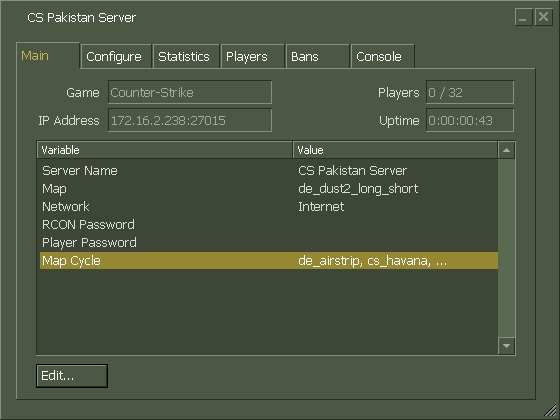
    If everything goes fine, the server console will be started like below.
  3. counter strike 1.6 servers download, counter strike 1.6 server hosting, counter strike 1.6 deathmatch server, counter strike 1.6 game servers, server counter strike 1.6, counter strike servers, counter strike 1.6 servers india, counter strike source servers, dedicated server counter strike 1.6, counter strike 1.6 servers free download

  4. Testing
    This step is just to make sure that you have properly configured the server.
    Open your game and click on Add Server.
    Enter your Private IP with Port and click Add.
    If you can see your server running, you can proceed to the next step.

  5. Open Firewall
    Now you have to open your Windows Firewall so that other people can connect to your server.
    You need to open UDP port 27015 on your windows firewall.
    Follow steps on this link to open Windows Firewall ports:
    http://windows.microsoft.com/en-us/windows/open-port-windows-firewall
    At this stage, you have created a LAN server which means people connected to your Router can now join your server.

  6. Port Forwarding
    Now you have to “Forward the ports from your Router to your Computer” so that Online Players can connect to your server.
    In simple words, all the people connecting to your Router on port 27015 will be forwarded to the port 27015 of your Computer.
    There are hundreds of thousands of router models with different port forwading methods each.
    Here are steps for some routers:
    http://www.counterstrike.com.pk/2014/03/port-forwarding-on-dsl-modem-router/
    For other routers, just google about it and you will find the steps.

  7. Testing
    This step is to make sure the firewall and ports are properly opened.
    Send your Public IP to your frind and ask him to join your server (182.180.66.151:27015)
    To find your Public IP, visit this link : http://www.whatismyip.com/
    whatismyip
    Now you have created an Online Server which means people from all around the world can join your server.


Thanks to Muhammad Ather, Saud Irfan for their help and Shoaib for the latest HLDS setup!

Having problems? Just comment below and we will find you a solution!